Product Reviews · Dealer Services
Autoline Dealer Registration Review: Give Your Vehicle Stock a Professional Home
Your yard holds the stock. Your online presence should make it easy to explore.
A well-presented vehicle deserves a clear, organised listing. For a dealer managing trucks, trailers, buses or other commercial vehicles, buyers need more than a model name: they need useful photographs, accurate specifications and an easy way to ask questions.
Autoline dealer registration introduces businesses to the platform’s dealer services and PRO-account options. It is a starting point for discussing how your stock, company information and advertising workflow can be presented through Autoline.
Share your business needs and discuss the right service package with the platform.
VIEW DEALER SERVICES & APPLY →Request current package pricing, included services and activation terms from Autoline.
What Does Dealer Registration Involve?
Autoline’s official registration page describes four stages: submit an application, receive a manager’s call, choose a package and create the company’s sales page. The form includes business and contact information.
Prepare the basics before applying: your company name, website, contact person and an approximate stock count. Use the manager discussion to explain what you sell and how often your inventory changes.
Tools for Presenting and Managing Your Stock
Autoline publishes a range of dealer advertising and automation services. Confirm which tools are included in the package offered to your business.
| Published service | How to discuss it for your dealership |
|---|---|
| Vehicle ads with descriptions, photos and videos | Ask how your stock and media will be added. |
| Company page and seller-directory entry | Plan your public business profile and contact details. |
| Stock import/export | Identify the system you currently use to maintain inventory. |
| Ad statistics | Agree how you will review listing engagement. |
| Promoted ads and renewal options | Discuss placement choices for selected stock. |
| Subscriber mailings | Ask how new listings reach relevant subscribers. |
A Company Page Buyers Can Explore
The dealer-registration page describes company profiles containing business information, contacts, location details and stock. A dedicated page gives you a place to organise those details consistently.
Our recommendation: use a short, specific company introduction. State the vehicle types you handle, opening hours and who answers sales enquiries. Keep collection information clear so an interested buyer knows the next step.
Photos and Videos With a Purpose
Build a repeatable stock-photography routine: exterior views, cab or interior, body configuration, identification details and included equipment. For vehicle videos, show what a buyer would reasonably want to examine and describe the unit accurately.
A useful listing reduces the amount of basic information that has to be repeated in every enquiry. Treat the description and media as the start of a professional handover conversation.
Discuss listing volumes, media, inventory updates and the services you want to use.
REQUEST A DEALER-PACKAGE CONSULTATION →Request current package pricing, included services and activation terms from Autoline.
Explore the Dealer Website Option
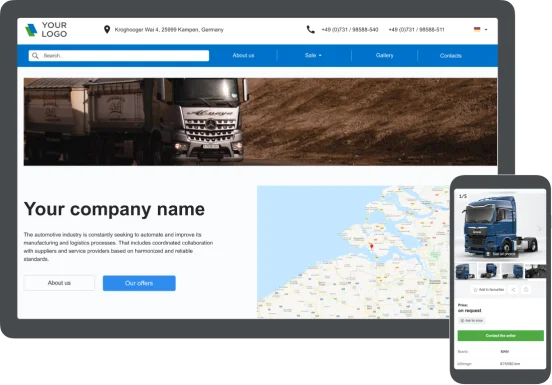
Linemedia’s official website-builder page describes a dealer website integrated with Autoline. Its published options include a platform subdomain or your own domain, a choice of design and colours, and stock synchronisation.
This is worth discussing if your dealership wants its inventory and company information presented on a separate website. Ask the manager to demonstrate the available layout, language options and content controls for the proposed service.
Use Statistics to Organise Follow-Up
The dealer page describes metrics including ad views, phone-number views, messages and messenger clicks. These give a business useful information to review alongside its own enquiry records.
Our suggestion is to keep a simple weekly log: which vehicles attracted enquiries, what buyers asked and which replies led to a viewing. Review that log with the platform statistics to decide where a clearer description or additional photograph would help.
Ask about the built-in translation tool and personal manager support when discussing your package. These are listed dealer-service features, and the manager can explain their current scope.
Published Guidance for Account and Transaction Safety
Autoline’s official safety guidance recommends keeping login details private and checking website addresses before entering account information. It also advises sellers to confirm payment before vehicle re-registration and to manage original registration documents in line with the completed payment and transfer process.
Keep these steps within your dealership’s documented sales procedure. For any vehicle advertised with safety equipment, describe the actual installed configuration using the vehicle’s records and manufacturer documentation.
Five Questions for Your Package Consultation
- Stock allowance: how many active listings does the proposal cover, and how are changes handled?
- Included tools: which profile, automation and promotion services are part of the quotation?
- Inventory source: can your current stock feed or website be used, and what setup is needed?
- Commercial terms: what are the price, billing period, tax treatment and renewal terms?
- Launch plan: what must your team provide, and who supports the initial setup?
These questions turn registration into a defined service discussion. If your main goal is finding a vehicle rather than advertising stock, read our Autoline marketplace review for buyers.
Our Review Verdict
Autoline dealer registration is worth exploring for businesses that want a structured way to present commercial-vehicle stock and discuss listing-management services. Its published offering brings company information, vehicle media and stock-management tools into one dealer-service conversation.
Start with your actual inventory and workflow. Request a package proposal, review the included services and agree how your dealership will prepare its listings. That gives your online presence a clear purpose from the beginning.
Explore the registration process and request a proposal for your business.
START YOUR AUTOLINE DEALER ENQUIRY →Request current package pricing, included services and activation terms from Autoline.
Frequently Asked Questions
Is dealer advertising a paid service?
Autoline’s official help pages describe ad placement as paid, with service packages for companies. Request current pricing and package details.
Can my dealership use its own domain?
The website-builder information describes own-domain and platform-subdomain options. Discuss activation and domain arrangements with the manager.
What does the Verified Dealer badge indicate?
Autoline’s help page describes a PRO account with contact details verified by its team and a dedicated dealer page. Confirm the registration requirements with the platform.
Can vehicle listings include video?
Yes. The official dealer information describes listings with photographs and videos. Ask how your existing vehicle media will be uploaded or imported.
Sources and Editorial Information
- Autoline: official dealer registration
- Autoline: advertising and automation services
- Autoline: dealer website builder and example image
- Autoline: seller tools and service information
- Autoline: account and transaction guidance
Researched on 9 October 2026. Published service descriptions explain available options; your agreed quotation establishes the included package. Practical listing and workflow recommendations are HSSE TIPS editorial guidance.
HSSE TIPS — Worksite Safety Hub
Every Task. Every Person. Home Safe.
Your experience matters
Share your thoughts on this page
Have a question, a useful experience or a suggestion? Add your input below.
Comments are public. Keep them respectful and relevant. Do not share contact details, confidential information or emergency reports.
Comments on this page
Loading comments…